> For the complete documentation index, see [llms.txt](https://mememarket.gitbook.io/mememarket/llms.txt). Markdown versions of documentation pages are available by appending `.md` to page URLs; this page is available as [Markdown](https://mememarket.gitbook.io/mememarket/mememarket/trading-getting-started.md).
# Trading - Getting Started
### 0. 🛠 Getting Started: Connect & Deposit
* 🐦 Twitter (X) — log in via Privy
* 📱 Telegram — log in via Privy
* 👛 Wallet — Phantom
#### 🔐 How to Sign In with X (Twitter) and Telegram
1. Click **“Sign in with Twitter/Telegram”** on the login screen.
2. You’ll be redirected to X/Telegram to authorize access.
3. Approve the request and you’ll be returned to the app — logged in and ready to go.
✅ Your trading stats, wallet, and referral activity are automatically linked.\
🔗 Powered by **Privy** — secure login + embedded wallet in one.
Your wallet stays non-custodial — we never touch your funds.
* **⚡ Deposit SOL to enter prediction rounds**
* Your wallet must contain SOL to start placing bets.
*For the best experience, we recommend using the **Phantom Wallet**.*\
👉 *Learn how to fund your Phantom Wallet* [*here*](https://phantom.com/learn/crypto-101/where-and-how-to-buy-solana-SOL)
* 💼 Your deposit appears in the wallet interface
🔐 All funds stay in your non-custodial wallet — we never hold your assets
***
### 1. Active Markets Page
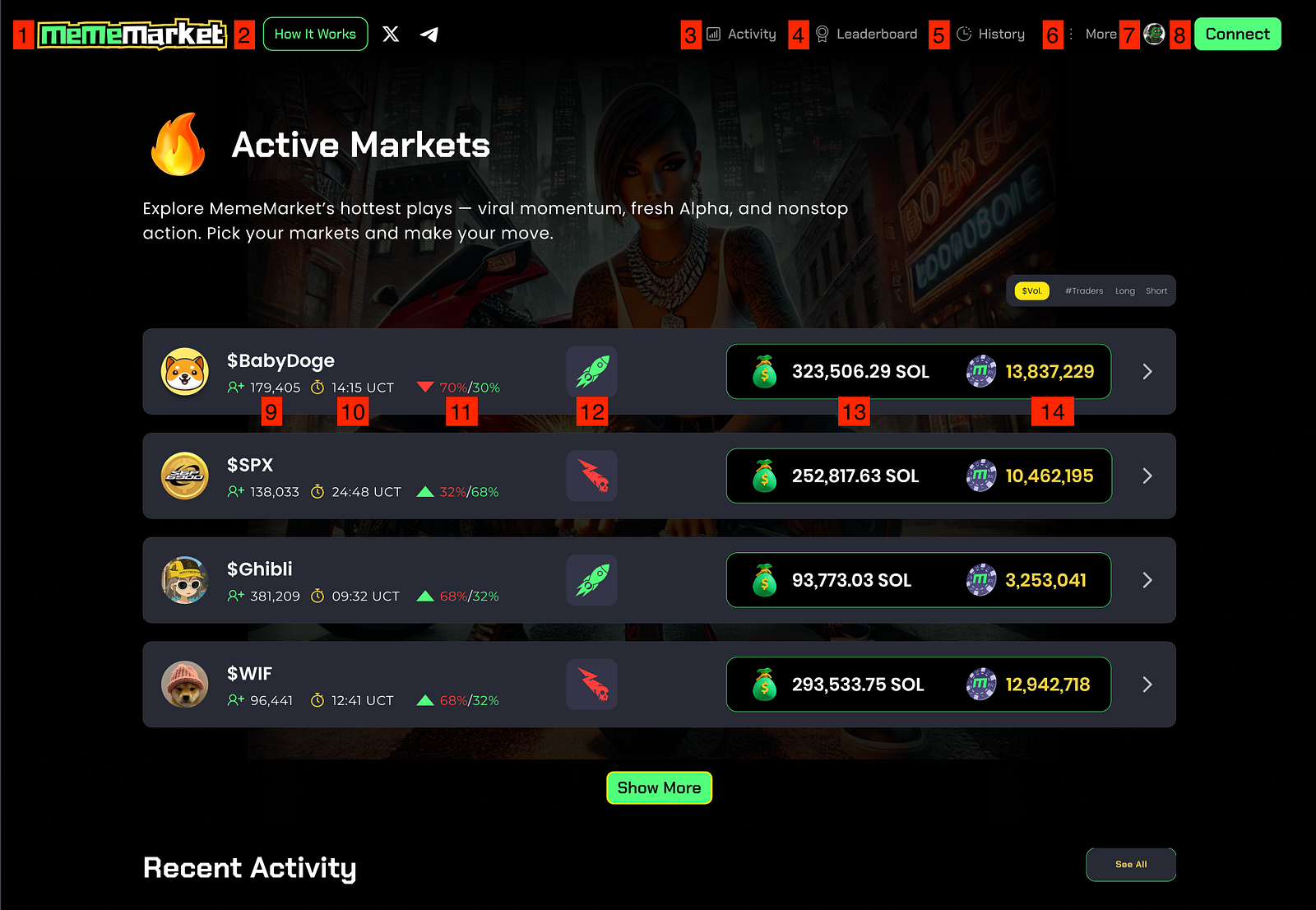
**1. MemeMarket Logo**\
Go back to the Homepage anytime.\
\
**2. “How It Works” Button**\
Opens this quick-start guide with everything you need to know.\
\
**3. Activity**\
This section shows real-time trader actions within the current live market.\
\
**4. Leaderboard**\
Opens the leaderboard with the most profitable traders across all rounds.\
\
**5. History**\
Shows past market rounds, including outcomes, strike prices, and performance of each side.\
\
**6. More Menu**\
Access key platform links:\
• Platform Docs\
• Website\
• Legal docs
*All links open in a new tab.*\
\
**7. Trader Profile**\
Tap to open your profile — view your current rank, performance, rewards, and trade history.\
\
**8. Connect Wallet**\
Tap here to connect your Phantom wallet and start trading.\
\
**9. Number of Active Traders**\
Shows how many traders joined this round (Pump + Dump combined).\
\
**10. Countdown Timer**\
Time left in the live round. When it hits 00:00, the round ends and results are calculated.
⚠️ *If the strike price is hit before the timer runs out, the round ends immediately and results are displayed.*\
\
**11. Market Positions (Pump vs Dump)**\
Displays current positions — % of traders predicting price will go up (Pump) vs down (Dump).\
\
**12. Trade Direction Icon**\
Visual indicator showing the direction of the current market question — green rocket for *Pump* (price increase), red skull for *Dump* (price decrease).\
\
**13. Volume in the Market**\
The total amount of SOL staked in this round.
**14. Liquidity Rewards Pool**\
Shows how much $MFUN is available to earn in this round — distributed to all traders, win or lose at the end of each week.
***
### 2. 🔥 Join a Live Market
Jump into an ongoing prediction round on a trending meme coin like $BONK or $BabyDoge. Each round is a short-term battle of sentiment and volatility.
You’ll see:
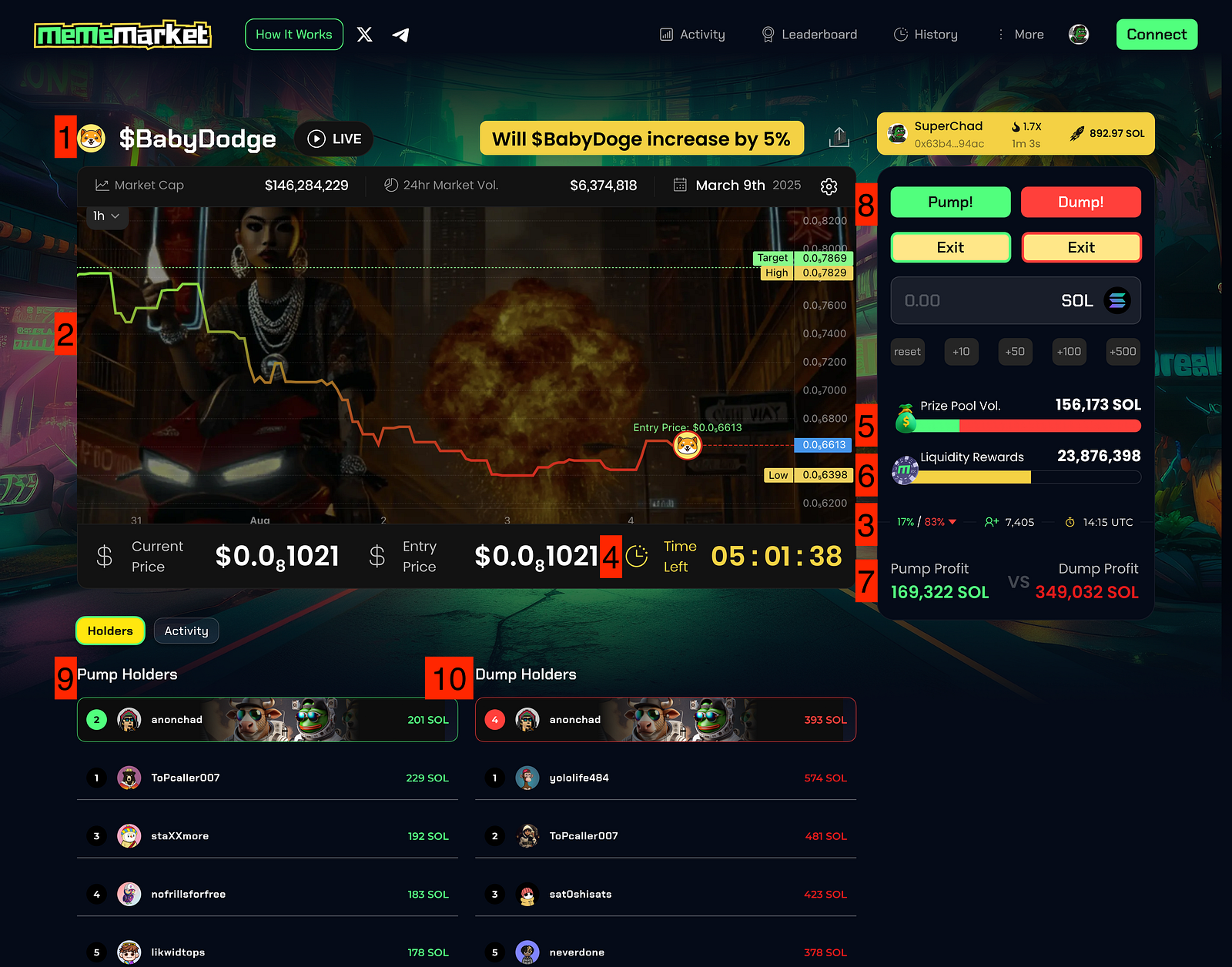
**1. Current Meme Coin Name & Status (LIVE)**\
Displays the name of the meme coin being traded — in this case, **$BabyDoge** — along with a **LIVE** indicator showing that the market is active and open for predictions.
**2. Price Chart**\
Shows real-time price movement of the token helping traders quickly gauge volatility and market direction.
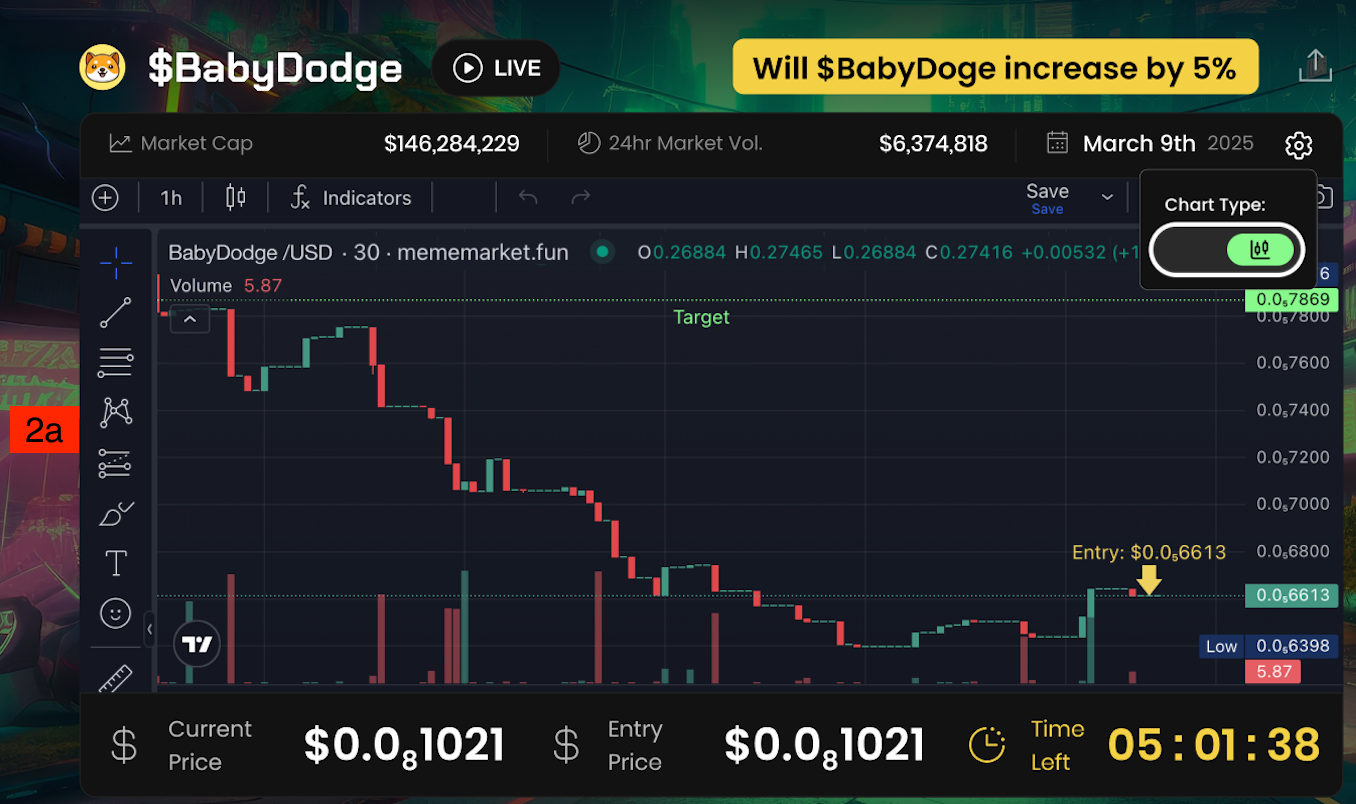
**2a. Switch to Advanced Trading Chart**\
Clicking the **Chart Type** toggle allows traders to switch to the advanced trading chart view. This view provides access to candlestick charts, historical price movements, technical indicators, and tools for more sophisticated analysis — helping traders make more informed decisions.
**3. Real-Time % of Positions (Traders on Each Side)**\
Displays the percentage of players currently betting on each side — Pump vs. Dump. For example, **17% / 83%** means 83% of traders believe the price will fall.\
\
**4. Countdown Timer**\
Shows the time left in the current round. Once the timer ends, all positions are closed and results are locked in.
**5. Prize Pool Volume**\
The total amount of **SOL** staked in the current round. This pool is distributed to **winners** (the correct side) proportionally to their share of the total stake on that side.
*See Risk Adjusted Gitbooks page to learn more*.\
\
**6. Liquidity Provisioning Rewards**\
This is the total amount of liquidity rewards shared by all traders — **win or lose**.\
The more liquidity provided, the more rewards earned. Every trader earns liquidity rewards, even for incorrect predictions.
*See Liquidity Rewards Gitbooks page to learn more.*
**7. Profit Tracker (Pump vs. Dump)**\
**Total combined real-time profit potential** if the price moves in favor of Pump or Dump. Displays how much traders on each side stand to gain if their prediction is correct — calculated live based on current market data and position sizes.\
\
**8. Pump/Dump Buttons to Open Positions**\
Allows traders to place or exit bets:
* **Pump** = predict price will go up (Long Position)
* **Dump** = predict price will go down (Short Position)
* **Exit (Pump/Dump)** = close your position(s) before the round ends
🔷 *Note:* The “**Positions**” shown on trader profiles or in the **Holders tab** refer to the **total number of Pump/Dump transactions** (entries and exits), not just currently active positions.\
\
**9. Pump Holders**\
Leaderboard of traders who bet on **Pump**. Displays their usernames and current profits (or losses). Rankings are updated live throughout the round.\
\
**10. Dump Holders**\
Same as above, but for traders who bet on **Dump**. This list tracks each trader’s results and ranks them based on performance.
*💡**Strategy Tip:** Enter early or take a contrarian position for an edge.*
***
### 3. 🚀 Open Your Trade
Start trading in just a few taps:
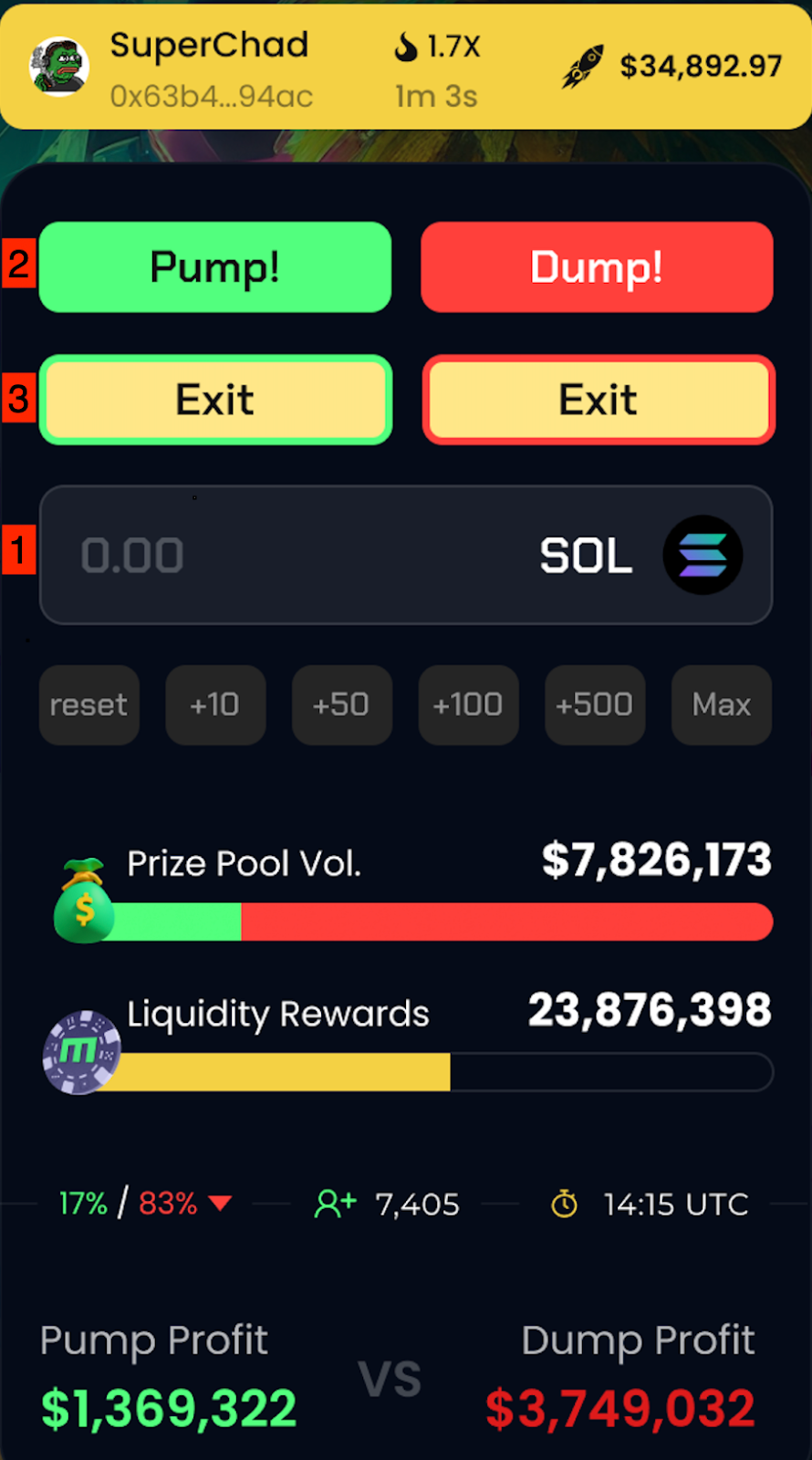
1. **Set Position Size**\
Use quick buttons (+10 / +50 / +100 / Max) or enter your SOL amount manually.
2. **Choose Direction**\
Tap **Pump 🚀** or **Dump 📉** to instantly place your prediction.
✅ **Done!** You’re now competing in real-time. Watch the chart and market sentiment live.\
You can open and close **unlimited positions** of **any size** in each round. Stack your bets or hedge by taking both sides — Pump & Dump.
* **Exit Buttons:** Change your mind or want to hedge some risk? Use the Exit buttons to exit your position or switch sides before the round ends.
* ⏳ **Exit Deadline** Once the countdown hits zero — or the “Call Price” is triggered — the round closes and your prediction locks in. Time it wisely.
🧠 **Pro Strategy Tip**:
You can **enter both Pump (Long) and Dump (Short) positions** in the same round.\
This lets you **hedge risk**, diversify exposure, or amplify asymmetric outcomes based on market sentiment swings.
***
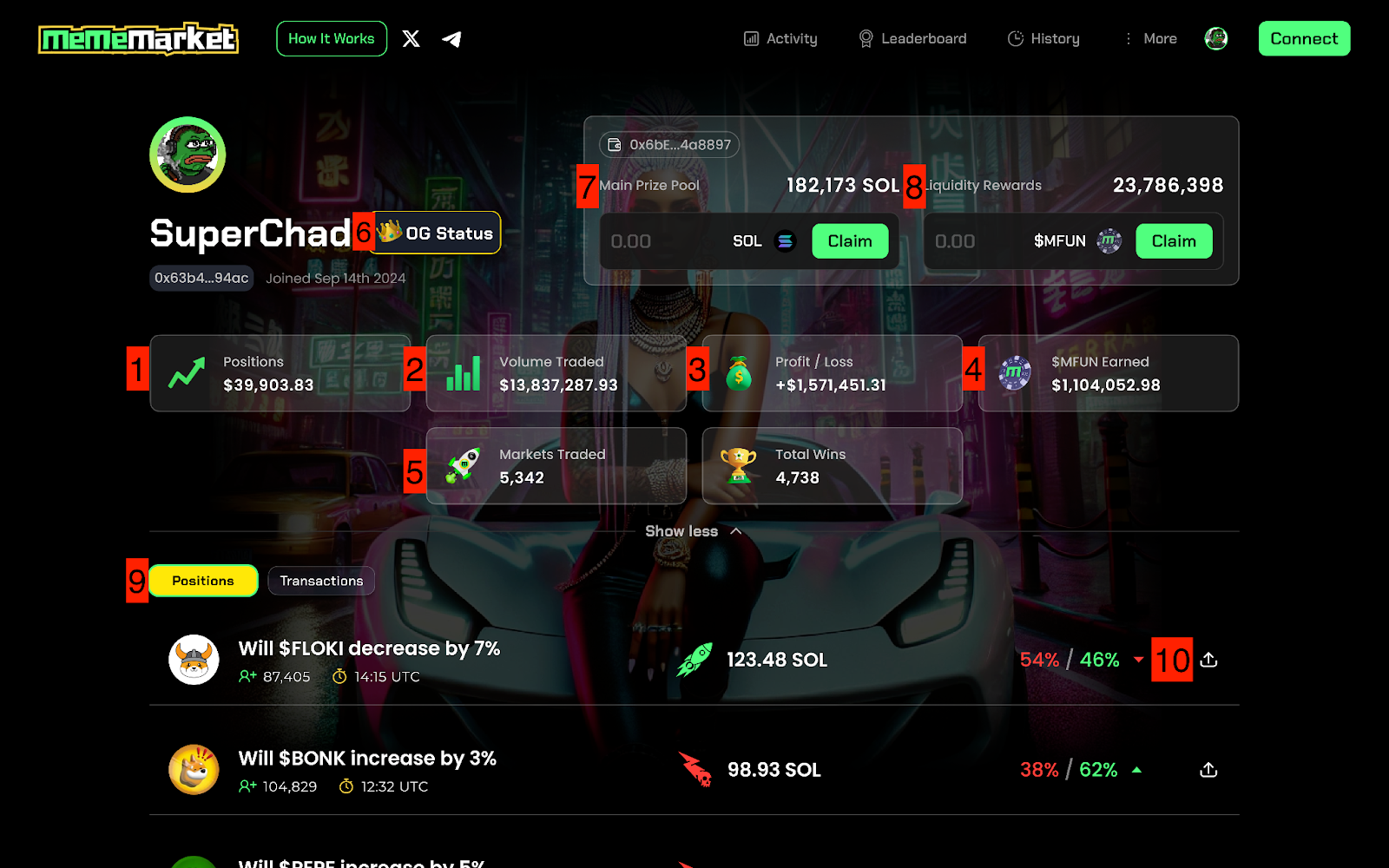
### 4. 💼 Claim & Monitor Your Portfolio
#### 🧑🚀 Personal Stats
**1. Total Positions**\
Total SOL placed across
**2. Total Volume Traded**\
Your all-time activity
**3. Profit / Loss**\
Net ROI from all predictions\
\
**4. Total Liquidity Rewards Earned**\
Passive yield from participation
**5. Total Markets Traded & Wins**\
Showcase your experience
**6. OG Status**\
Indicates current OG status
**7. Claim Prize Pool** **Winnings**\
Claim your SOL only if your prediction was correct\
\
**8. Claim Liquidity Rewards**\
Claim your weekly rewards from every position, win or lose
**9. Position Overview**\
View all open trades with direction, size, and countdown — and compare live Pump vs. Dump stats by volume and number of players
**10. Share to X** \
Lets users share their position or trade on X (formerly Twitter) to show off gains or predictions. Opens a pre-filled tweet with stats and emojis.
***
### 5. 📜 Track Market Results
**🔥 See outcomes of completed rounds:**\
\
**1. Final Result: Pump or Dump**\
Indicates whether the round ended with a **Pump** (price increased and target was hit) or **Dump** (price dropped to or below the strike level).
🟢 Green rocket = Pump win\
🔴 Red rocket = Dump win\
\
**2. Final Market Positions (Pump vs Dump)**\
Shows what percentage of traders were on each side during the round — \
e.g. **24% / 76%** means 24% predicted Pump, 76% predicted Dump.\
\
**3. Total Prize Pool Volume**\
Displays the total amount of **SOL** staked by all traders in this round.\
\
**4. Trader Count**\
Total number of traders in the round (combined Pump and Dump entries). Higher trader counts often signal more popular or volatile markets.\
\
**5. Market Close Time**\
Shows the **exact UTC timestamp** when the prediction round ended.\
\
**6. Liquidity Rewards Distributed**\
Shows the total amount of rewards that were distributed to all traders in this round; regardless of win or loss. These are part of the protocol’s liquidity incentives.\
\
**7. View Market Details**\
Clicking this arrow opens the **full summary page** for that completed prediction round — including all traders, their positions, entries, exits, profits, and more.
*📈**Pro Strategy Tip**: Use past results to sharpen future trades.*
***
### 6. 🟡 Activity Tab (Live Trading Feed)
This section shows real-time trader actions within the current live market. Every trade, exit, and position update is listed here with key details:
**1. Market & Player Info**\
Displays the market question, token icon, and the trader’s wallet address or display name (wallet is shown by default). Clicking the token icon or question opens the corresponding prediction round. Clicking the trader’s name or wallet opens their on-chain profile.\
\
**2. Position Type (Pump / Dump / Exit)** \
Indicates what kind of action the trader performed:
* **🟢 Rocket (Pump):** Entered a “Pump” position (bet on price going up)
* **🔴 Skull & Arrow (Dump):** Entered a “Dump” position (bet on price going down)
* **🏳️ Exit:** Closed their position (either Pump or Dump) before the round ended
**3. Profit/Loss Value** \
Shows the current value of that trader’s position. This amount updates live as the market price changes.
*Note: It reflects the profit if the round ended at this exact moment.*
**4. Position Size or % Weight**\
Displays the % contribution that a trader's stake has within their selected side (e.g. 1.7% of total Pump side volume). This gives context on how big their position is relative to others.
**5. Timestamp / Time Since Action**\
Shows how long ago the trader placed or exited their position — e.g. “32s” ago. This helps track recent market movement and momentum.
**6. Share to X**\
Lets traders share their position or trade on social media (e.g. X/Twitter) to show off gains or predictions. Opens a pre-filled tweet with stats and emojis.
***
#### 🤑 Earn More As You Trade
In MemeMarket, whether you win or lose, you still earn.
🥇 **Correct price call**: Earn SOL + Liquidity Rewards
💸 **Wrong price call**: Still earn Liquidity Rewards